Streamlining Digital Art: A Practical Look at the Glitch Photoshop Photo Template
In the rapidly evolving landscape of digital design, aesthetic trends shift with remarkable speed. Among the most enduring and visually striking styles is the glitch effect, a technique that mimics digital errors, data corruption, and signal interference to create compelling, modern imagery. For professional designers and hobbyists alike, achieving this look manually can be a tedious process involving complex layer manipulations, channel shifting, and precise masking. This is where a specialized Glitch Photoshop Photo Template becomes a valuable asset. Rather than serving as a rigid preset, these tools function as automated workflows that democratize access to high-end visual effects while maintaining the flexibility required for professional output.
Understanding the Mechanics of Automated Glitch Effects
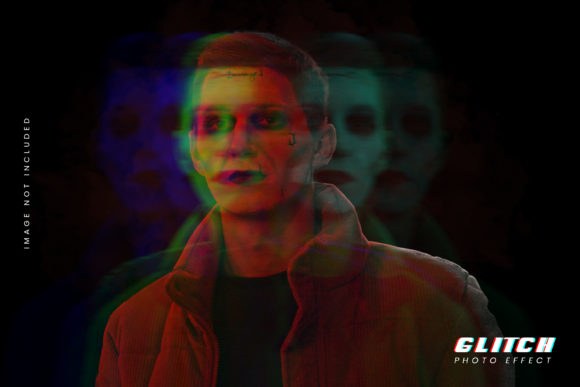
At its core, a glitch action in Adobe Photoshop is a recorded sequence of commands that automates the technical steps of creating distortion. When you utilize a Glitch Photoshop Photo Template, you are not merely applying a static filter. Instead, you are triggering a script that performs multiple operations simultaneously. These typically include splitting color channels (red, green, and blue), offsetting them horizontally or vertically, adding noise, and applying displacement maps. The distinct advantage of a well-constructed template is that it handles the mathematical precision of these shifts, which can be difficult to eyeball manually.
The primary appeal lies in the balance between automation and control. Many users fear that automated actions will result in generic, cookie-cutter images. However, high-quality templates are designed to produce completely layered and customizable results. This means that once the action has finished running, every element of the glitch effect exists on its own sub-layer. You are not left with a flattened image; rather, you have a structured document where you can adjust the opacity of specific distortions, change blend modes, or mask out areas where the effect is too aggressive. This level of granularity ensures that the tool serves your creative vision rather than dictating it.
Comparing Manual Techniques vs. Automated Actions
To truly evaluate the worth of a Glitch Photoshop Photo Template, it is helpful to compare it against the traditional manual workflow. Creating a glitch effect from scratch involves duplicating layers, unlinking them, moving them pixel by pixel, and often using the "Difference" or "Exclusion" blend modes. While this method offers ultimate control, it is time-consuming. For a designer working on a tight deadline or managing a batch of social media assets, spending forty-five minutes on a single effect is rarely feasible.
Conversely, an automated action reduces this process to seconds. You simply encounter over your print area, play the action, and the software does the heavy lifting. The trade-off, however, is the initial learning curve of understanding how to modify the result. With manual creation, you build the effect step-by-step, so you understand every component. With an action, you must learn how to deconstruct the generated layers to make adjustments. For most users, especially those who are not complete newcomers but also not expert scripters, the time saved far outweighs the minor adjustment period required to master the template’s structure.
The Value of Randomization and Uniqueness
One of the most sophisticated features found in advanced glitch actions is the ability to generate unlimited randomized results. In digital design, repetition is the enemy of authenticity. If a template produces the exact same pixel shift every time it is used, it quickly becomes recognizable and loses its impact. High-quality templates incorporate randomization algorithms into their code. This means that even if you use the same brushed area or the same source image, running the action twice will yield two distinct variations.
This feature is particularly useful for A/B testing in marketing campaigns or for creating series of artworks that share a cohesive style but remain visually distinct. It allows designers to explore multiple aesthetic directions without having to manually tweak parameters each time. You can colorize the results with a single click and randomize the colors in seconds, enabling rapid experimentation. This iterative process encourages creativity, as you can generate ten variations in the time it would normally take to create one manually, selecting the best outcome for your specific project.
Customization: Text, Fonts, and Color Grading
Beyond the visual distortion, a versatile Glitch Photoshop Photo Template often includes integrated typography elements. In many glitch art compositions, text is not just an addition but an integral part of the distortion. Premium templates provide completely editable text layers, allowing you to insert your own copy, choose your preferred font, and adjust sizing without breaking the effect. The action is designed to apply the glitch distortion to the text simultaneously, ensuring that the typography feels embedded in the digital error rather than pasted on top.
Color grading is another critical aspect. Glitch art often relies on high-contrast, neon, or desaturated palettes to enhance the feeling of digital decay. A robust template will offer easy-to-use adjustment layers for colorization. Whether you need a cyberpunk-inspired neon glow or a subtle, monochromatic static effect, the ability to modify hues globally ensures the final image aligns with your brand guidelines or artistic intent. This flexibility makes the tool suitable for a wide range of applications, from album covers and event posters to website headers and social media graphics.
When to Use a Template and When to Build Manually
Deciding whether to invest in a Glitch Photoshop Photo Template depends largely on your workflow volume and specific creative needs. If you are a designer who frequently incorporates glitch aesthetics into client work, personal projects, or content creation, the template is an indispensable efficiency tool. It saves hours and days of work over the course of a year, allowing you to focus on composition and concept rather than technical execution.
However, there are scenarios where manual creation may still be preferable. If you require a highly specific, non-standard distortion that defies typical channel-shifting logic, building the effect from scratch gives you total freedom. Additionally, if you are learning the fundamentals of Photoshop, manually creating glitches can be an excellent educational exercise in understanding layers, blend modes, and masks. Yet, for the majority of practical applications—where consistency, speed, and professional polish are paramount—the automated template offers a superior return on investment.
Making an Informed Decision
When evaluating different glitch actions, look for indicators of quality such as non-destructive editing capabilities, clear layer organization, and positive user feedback regarding ease of use. The best tools are those that feel intuitive, even for complete newcomers, while offering enough depth for experienced professionals. Ensure the template supports your version of Photoshop and check if it includes documentation or support for troubleshooting.
Ultimately, a Glitch Photoshop Photo Template is more than just a shortcut; it is a creative partner that handles the technical complexities of digital distortion. By providing unique, randomized, and fully customizable results, it empowers designers to produce amazing glitch effects with ease and delight. Whether you are looking to refresh your portfolio, streamline your client deliverables, or simply experiment with new visual styles, integrating a reliable glitch action into your toolkit can significantly enhance your creative efficiency and output quality.