Integrating Forest Seasons Clipart into Professional Design Workflows
In the fast-paced world of digital content creation, efficiency is not just a preference; it is a necessity. Whether you are a small business owner managing your own branding, a freelance graphic designer juggling multiple client deadlines, or an educator creating engaging classroom materials, the assets you choose can significantly impact your production timeline. Forest Seasons Clipart represents more than just a collection of images; it is a strategic resource designed to streamline the visual storytelling process across various seasons and applications. By understanding how to effectively integrate these vector illustrations into your existing workflows, you can maintain high-quality output while reducing the time spent on repetitive design tasks.
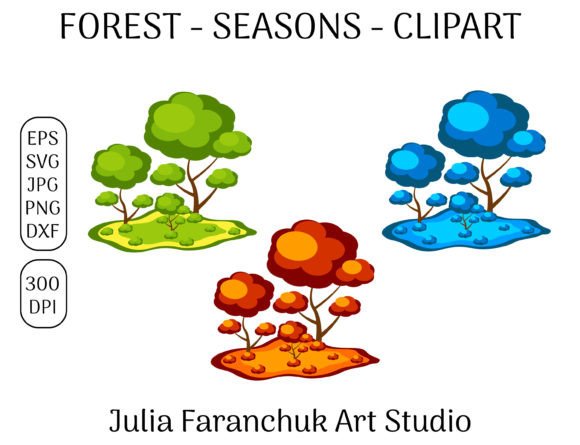
This guide explores the practical implementation of cartoon-style forest elements—trees, bushes, and meadows—across summer, autumn, and winter themes. We will examine how these assets fit into broader creative processes, from initial concept planning to final file preparation for print and digital media.
Understanding the Asset Structure and Compatibility
Before diving into specific use cases, it is crucial to understand the technical foundation of Forest Seasons Clipart. The value of this collection lies in its versatility, provided by multiple file formats tailored for different software ecosystems. A common bottleneck in design workflows is format incompatibility, which forces creators to convert files manually, often resulting in quality loss. This collection mitigates that risk by offering a comprehensive suite of formats.
- EPS Files: Ideal for professionals using Adobe Illustrator or other vector-based programs. These files allow for infinite scalability without pixelation, making them perfect for large-format printing like banners or vehicle wraps.
- SVG Files: The standard for web developers and users of cutting machines like Cricut and Silhouette. SVGs are lightweight, code-based vectors that render crisply on any screen size and are easily editable in software like Inkscape and Corel Draw.
- DXF Files: Specifically formatted for AutoCAD and similar engineering or architectural design tools, ensuring precision for technical projects that require landscape elements.
- PNG Files: High-resolution raster images with transparent backgrounds. These are essential for quick drag-and-drop usage in presentation software, word processors, or basic photo editors where layering is required without complex masking.
- JPG Files: High-resolution static images suitable for immediate use in documents or platforms that do not support transparency, delivered at 300 dpi for professional print quality.
By having access to all these formats, you eliminate the need for third-party conversion tools, thereby reducing potential errors and saving valuable time during the execution phase of your project.
Strategic Implementation in Seasonal Marketing Campaigns
For marketers and entrepreneurs, consistency in branding is key, but so is relevance to the current season. Forest Seasons Clipart allows businesses to adapt their visual identity throughout the year without undergoing a complete rebrand. The cartoon style offers a friendly, approachable aesthetic that works well for community-focused brands, eco-friendly products, and family-oriented services.
Consider the workflow for a quarterly newsletter or social media campaign. In the planning stage, you can select the appropriate seasonal assets—lush green trees for summer, vibrant orange foliage for autumn, and snowy pines for winter. Because the style remains consistent across all three seasons, your audience recognizes your brand voice even as the visuals change. This continuity builds trust and recognition.
During the design phase, using the SVG or EPS files allows you to recolor elements to match your specific brand palette. For instance, if your brand color is teal, you can adjust the green hues of the summer meadow to align with your corporate identity. This level of customization ensures that stock assets do not look generic but rather feel bespoke to your business.
Enhancing Digital Products and Print-on-Demand Efficiency
The rise of print-on-demand (POD) services has created a massive opportunity for creators to monetize digital designs. However, success in this arena depends heavily on file quality and preparation. Forest Seasons Clipart is optimized for this specific workflow. The high-resolution PNG files (5000 x 5000 pixels at 300 dpi) meet the strict requirements of major POD platforms for products like t-shirts, mugs, and tote bags.
When preparing designs for fabric printing, transparency is critical. The PNG files provided in this collection come with transparent backgrounds, allowing you to place the forest elements directly onto colored mockups without white boxes appearing around the edges. This simplifies the quality control process, as you can visually verify the design placement before uploading.
For those using cutting machines to create physical goods like vinyl decals, greeting cards, or gift tags, the SVG and DXF files are indispensable. These formats preserve the vector paths necessary for precise cutting. A typical workflow involves importing the SVG into Silhouette Studio or Cricut Design Space, resizing the tree or bush elements to fit the material dimensions, and sending the job to the cutter. The clean lines of the cartoon style ensure that intricate details are cut accurately, reducing material waste and production errors.
Streamlining Educational and Editorial Content Creation
Educators and publishers often face tight deadlines when developing learning materials. Visual aids are proven to enhance comprehension and retention, but sourcing appropriate, copyright-safe images can be time-consuming. Forest Seasons Clipart serves as a reliable library for creating worksheets, flashcards, and presentation slides.
The distinct seasonal variations allow for thematic lesson planning. For example, a science teacher explaining the life cycle of trees or weather patterns can use the corresponding summer, autumn, and winter illustrations to create a cohesive visual narrative. The simple, cartoon style is particularly effective for younger audiences, as it avoids the visual clutter of photorealistic images, allowing students to focus on the core concepts.
In editorial contexts, such as blog posts or online articles, the JPG and PNG files can be used to break up text and improve readability. Web designers can utilize the SVG files to ensure that these graphics load quickly and remain sharp on retina displays, contributing to better user experience and SEO performance. The lightweight nature of SVGs helps maintain fast page load speeds, which is a critical factor in search engine rankings.
Best Practices for Organization and Long-Term Use
To maximize the return on investment for any digital asset, proper organization is essential. When you download the Forest Seasons Clipart package, take the time to set up a logical folder structure on your local drive or cloud storage. Separate the files by format (EPS, SVG, PNG, etc.) and then by season. This upfront effort pays dividends when you are working under pressure and need to locate a specific winter tree vector quickly.
Additionally, consider creating a "master" document in your preferred design software where you import all the vector elements. This acts as a personal library or swatch book. You can copy and paste elements from this master file into new projects, ensuring that you always have access to the original, unedited vectors. This practice preserves the integrity of the original files and allows for non-destructive editing in your working documents.
Quality control should also be part of your routine. Before finalizing any print job, always check the resolution settings. While vector files (EPS, SVG, DXF) are resolution-independent, raster files (PNG, JPG) must be used at their intended size to avoid pixelation. The provided 300 dpi resolution is suitable for most standard print applications, but if you are scaling an image up significantly, stick to the vector formats to maintain crisp edges.
Conclusion: Elevating Your Creative Process
Integrating Forest Seasons Clipart into your workflow is about more than just adding pretty pictures to your projects. It is about adopting a systematic approach to design that values efficiency, consistency, and quality. By leveraging the right file formats for the right tools—whether that is Adobe Illustrator for vector editing, Cricut for crafting, or Photoshop for digital compositing—you can streamline your production process significantly.
From seasonal marketing campaigns to educational resources and print-on-demand products, these versatile assets provide the flexibility needed to adapt to various creative challenges. By organizing your files effectively and understanding the technical strengths of each format, you ensure that your creative energy is spent on innovation and strategy rather than troubleshooting file compatibility. Embrace these tools to enhance your productivity and deliver polished, professional results across all your seasonal projects.